
Which on-page SEO issues should you fix first?
Fix on-page SEO issues that prevent crawling, indexing or meaningful page access first, such as blocked resources, incorrect canonical tags, noindex directives and broken pages. Then address issues affecting relevance and usability—search intent, page content, title tags, headings, internal links, mobile presentation and page speed—prioritising pages with the greatest organic value.
Prioritise on-page SEO issues according to how severely they restrict crawling, indexing or access to a page, followed by issues that reduce relevance, usability and conversion potential. In practice, fix technical blockers first, then improve search intent and content quality, and finally refine elements such as metadata, internal links and page presentation. Apply this order to the pages with the greatest organic value rather than treating every audit warning as equally urgent.
Start with issues that prevent a page from being crawled or indexed
A page cannot perform in organic search if search engines cannot access it, understand that it should be indexed, or select it as the preferred version. These issues take priority over copy changes because improvements to content or metadata may have no effect until the page is eligible to appear in search results.
- Accidental noindex directives: Check whether important pages contain a noindex meta directive or an equivalent instruction in the HTTP header. Remove it where the page is intended to receive organic traffic, but retain it for pages that should deliberately remain out of search results.
- Robots.txt restrictions: Confirm that important URLs and the resources needed to render them are not blocked. A robots.txt rule may prevent crawling without removing an existing page from the index, so assess both the current directive and the page’s indexed state.
- Incorrect canonical tags: A canonical tag pointing to another URL can signal that the current page is a duplicate or less preferred version. Correct canonicals should normally identify the page’s own preferred URL where it is the authoritative, indexable version. Do not use canonical tags to conceal substantially different pages or to consolidate URLs without a clear reason.
- Broken or inaccessible pages: Resolve server errors, persistent redirects, faulty routes and pages that return an unexpected status. A page linked from navigation, an XML sitemap or an active campaign should not lead users or crawlers to an error response.
- Redirect problems: Replace outdated internal links with the final destination where possible. Investigate redirect chains, loops and redirects to irrelevant pages, particularly when they affect commercially important URLs.
Validate these changes after implementation. A directive can be correct in isolation but still conflict with another signal, such as a sitemap entry, internal link or canonical reference. The aim is not simply to remove warnings; it is to make the intended relationship between each URL, its content and its indexation status clear.
Next, address pages that target the wrong search intent
Once a page can be crawled and indexed, determine whether it provides the type of result a searcher is likely to need. A technically sound page may still underperform if it presents a product page for an informational query, a general overview for a highly specific query, or a contact page where users expect a detailed explanation.
Compare the page’s purpose with the language used in its title, headings and main content. Check whether the page answers the primary need directly and whether its format is appropriate. For example, a process-led query may need clear steps, while a comparison query may require distinct criteria and balanced explanations. If the intent is fundamentally wrong, rewriting isolated sentences or adding keywords will not resolve the underlying problem. Reposition the page, create a more suitable page, or consolidate overlapping content where appropriate.
Fix thin, incomplete or poorly structured content
Content issues should be prioritised by their effect on usefulness, not by word count alone. A concise page can be effective if it answers the query completely, while a long page can remain weak if it is repetitive, difficult to navigate or missing essential information.
- Make the main answer clear near the beginning of the page.
- Cover the important subtopics needed to make the page useful without adding irrelevant detail.
- Remove duplicated passages, unsupported claims and wording that adds no meaning.
- Use descriptive headings, short paragraphs and lists where they improve comprehension.
- Explain specialist terminology when a reasonably informed reader may interpret it in different ways.
- Check that claims, product details and technical recommendations remain accurate.
Review content against the page’s purpose and the needs of its intended audience. Content density findings can help identify pages with unusually little relevant text or an imbalance between the main subject and peripheral wording, but density should be treated as a diagnostic signal rather than a target to maximise.
Then improve title tags and headings
Title tags are important because they help search engines and users identify the page’s subject. Give each indexable page a distinct title that describes its main topic accurately and reflects the likely search intent. Put the most useful subject information early, avoid repetitive keyword strings and remove wording that makes the title misleading or difficult to scan.
The main heading should clearly describe the visible page content and should not conflict with the title tag. Supporting headings should establish a logical hierarchy and help users locate answers quickly. Fix missing, duplicated or vague headings when they obscure the page structure, but do not change heading levels solely to achieve a particular visual appearance. Presentation should be controlled with styling rather than with semantically incorrect markup.
Improve internal linking and important page relationships
Internal links help users move through related information and help search engines discover and interpret the relative importance of pages. Prioritise pages that are difficult to reach, commercially important or central to a topic but receive few relevant internal links.
- Link from relevant, established pages to important destinations.
- Use descriptive anchor text that indicates what the linked page contains.
- Link related supporting content to the appropriate service, category or central resource page where the relationship is genuine.
- Repair broken internal links and remove links that lead to redirected or irrelevant destinations.
- Check that navigation, breadcrumbs and other repeated links do not overwhelm the main content or create confusing paths.
Do not add links merely to increase the number of links on a page. Relevance and usefulness matter more than volume, and a strong internal linking change can be more valuable than correcting a minor isolated metadata warning.
Address mobile usability and page experience issues
Users should be able to read and interact with the page on common screen sizes without unnecessary friction. Check for content that extends beyond the viewport, text that is difficult to read, controls that are hard to use, intrusive interstitials, unstable layouts and media that delays access to the main content.
Page speed problems deserve priority when they affect important templates or prevent users from seeing or using the page promptly. Investigate oversized images, unnecessary scripts, render-blocking resources, inefficient third-party tools and excessive page complexity. Focus on the cause rather than applying superficial changes that improve a test result without improving the user’s experience. Performance work should be tested on representative templates and devices after deployment.
Leave low-impact refinements until the higher-risk work is complete
Minor issues such as slightly long metadata, small variations in heading wording or non-critical image attributes can be worth correcting, but they should not displace a blocked page, an incorrect canonical, a broken internal link or a page that fails to satisfy its search intent. Image alternative text is particularly important for accessibility and should describe meaningful image content; decorative images should not be given misleading descriptions. Optimise image filenames and metadata only where they provide genuine clarity.
Use impact and effort to decide what to do next
After identifying issue types, rank individual fixes using a combination of organic value, severity, scope and implementation effort. Give priority to problems affecting pages that already attract impressions, support important business objectives, receive valuable internal links or represent reusable templates. A single template correction may resolve the same issue across many pages, but review the affected URLs before applying a site-wide change.
A practical sequence is to:
- Export or review audit findings by URL, issue type and affected template.
- Separate indexation and accessibility blockers from relevance and enhancement opportunities.
- Identify the pages and templates with the greatest organic importance.
- Group related issues so that one implementation does not create conflicting changes elsewhere.
- Fix the highest-impact blockers and validate the affected URLs.
- Improve intent, content, titles, headings and internal links.
- Test mobile presentation and performance, then monitor organic visibility and user behaviour.
Re-audit after significant changes and inspect representative pages manually. Automated checks can identify missing directives, duplicate elements, broken links and structural inconsistencies, but they cannot always judge whether a page is genuinely useful or whether a canonical choice reflects the site’s strategy. Treat the audit as a prioritisation framework: resolve anything that prevents search access first, then make each important page the clearest, most relevant and most usable result it can be.
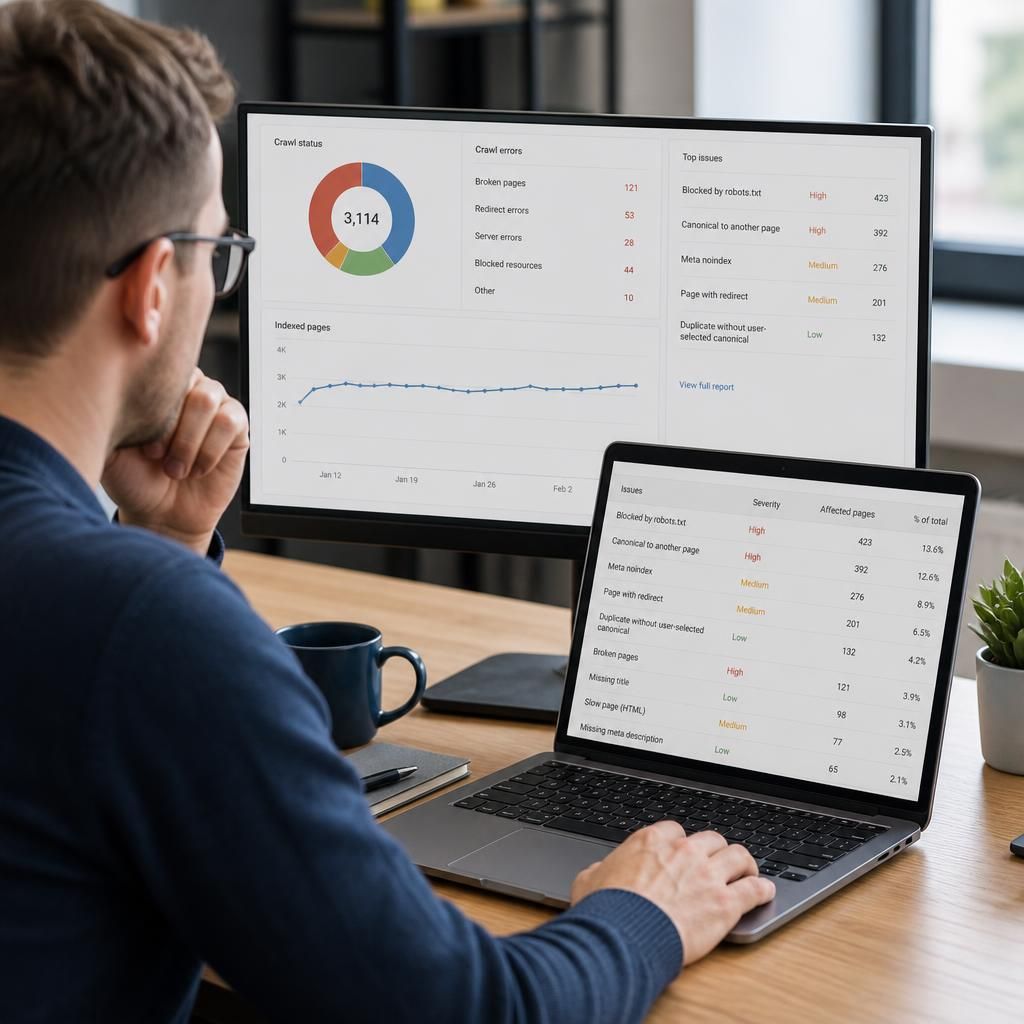
Prioritising on-page SEO issues means fixing the problems most likely to prevent valuable pages from appearing, being understood or satisfying searchers before addressing minor audit warnings. A blocked, non-indexable or broken page should take precedence over a slightly imperfect title or image attribute.
Assess each issue against the page’s organic value, the severity of the problem and the effort required to resolve it. Give particular attention to pages that attract impressions, support important business goals, receive strong internal links or use a shared template. A template-level correction may improve many URLs, but review the affected pages first to ensure the change is appropriate across the site.
- Resolve crawling, indexing, canonical and accessibility problems.
- Correct pages that target the wrong search intent or provide incomplete information.
- Improve titles, headings, internal links, mobile usability and performance.
- Leave minor wording and metadata refinements until higher-impact work is complete.
Recheck important URLs after implementation and compare audit findings with manual inspection. This confirms that the intended page is accessible, relevant and usable rather than simply reducing the number of reported issues.