
What can SEO Quake browser tools analyse?
SEO Quake browser tools analyse key on-page SEO elements, including titles, meta descriptions, headings, content, images, links and keyword usage. They can also provide SERP data and site-level metrics such as indexed pages, backlinks and domain information, helping you identify optimisation issues and compare search results.
SEO Quake browser tools analyse the technical and content signals that are visible on a webpage or search results page. They can review on-page elements such as title tags, meta descriptions, headings, text, images, links and keyword usage, while also displaying available domain and search-result metrics. This makes them useful for identifying straightforward optimisation issues, checking competitor pages and prioritising further investigation.
On-page SEO elements
The page analysis tools can inspect the main elements that influence how a page is understood by search engines and users, including:
- Title tags, including whether a title is present and how it is displayed.
- Meta descriptions and other metadata.
- Heading structure, such as H1, H2 and other heading elements.
- Body copy, including word count and the occurrence of selected terms.
- Images, including file names, alternative text and other available attributes.
- Canonical information, where it is exposed in the page source.
- Robots directives and related crawl-control signals.
- Open Graph and other social sharing metadata, when present.
These checks help you spot common issues such as a missing title, an empty meta description, duplicated headings, images without useful alternative text or a page that does not clearly target its intended topic. The tools identify what is present in the page, but they do not decide whether the wording is genuinely useful, accurate or appropriate for the audience. Those judgements still require editorial review.
Links and site structure
SEO Quake can list and classify links found on a page, including internal and external links. Depending on the view and available data, you can review destinations, anchor text and link attributes such as nofollow-related directives. This is useful for checking whether important pages are linked logically, finding broken or unsuitable destinations and reviewing how a page distributes internal links.
Link analysis should be treated as a diagnostic aid rather than a complete assessment of authority. A browser tool can inspect the links exposed on the page, but it cannot by itself determine the quality, relevance or editorial value of every referring website. Backlink and domain figures may also come from external indexes, so they can differ from the data in your own search platform or analytics systems.
Keyword use and content signals
The keyword-density and text-analysis features can show how often selected words or phrases appear and where they occur, such as in titles, headings, body copy or image attributes. This can help confirm that a page covers its intended subject and reveal obvious omissions or overuse.
Use these figures as indicators, not targets. Search engines do not reward a page simply because a phrase appears a particular number of times. Readability, topical coverage, accuracy, search intent and the usefulness of the information are more important than forcing a term into the copy. Variations, synonyms and natural language should be considered alongside the exact phrase being checked.
SERP analysis
When used on a search results page, the tools can display available information about individual results and the pages ranking for a query. Depending on the search engine, location, device and data available at the time, this may include:
- Page titles and URLs shown in the results.
- Domain and page-level authority or popularity indicators.
- Estimated indexed-page information.
- Backlink-related values.
- Cached or other search-result parameters supplied by the relevant data source.
SERP overlays are useful for comparing the pages that appear for the same search and identifying patterns in their content, structure and visible page elements. They should not be treated as a guaranteed ranking forecast. Search results vary by location, personalisation, device, language, timing and search history, and third-party metrics are estimates rather than direct ranking factors.
Domain and page metrics
SEO Quake browser tools can also present summary metrics for a page or domain, such as indexed-page information, link counts, domain age or other registration and popularity data where those values are available. These figures provide context when reviewing a site, but they are not a substitute for first-party data. Indexed-page counts can be incomplete or stale, and backlink totals vary between providers because each uses a different crawl and update process.
For decisions about traffic, conversions and technical performance, compare these observations with your search performance reports, web analytics, crawl data and server-side checks. Browser tools generally analyse what the extension can access in the browser; they do not replace a full technical SEO crawl, log-file analysis or a review of ranking data over time.
Practical ways to use the analysis
- Run the page analysis on an important landing page and check its title, description, headings, content, images and canonical signals.
- Review internal links to confirm that relevant supporting and commercial pages are connected clearly.
- Use keyword analysis to check topical coverage and remove accidental repetition, rather than pursuing a fixed density.
- Compare several relevant search results to understand common page structures and content requirements.
- Record any issues alongside data from your wider SEO tools before deciding what to change.
In summary, SEO Quake is most useful for fast, visible checks of on-page SEO, links, keyword usage, SERP results and selected site-level metrics. It helps you find evidence of potential problems quickly, while a complete optimisation decision should also consider technical crawlability, search intent, content quality, performance data and the page’s business purpose.
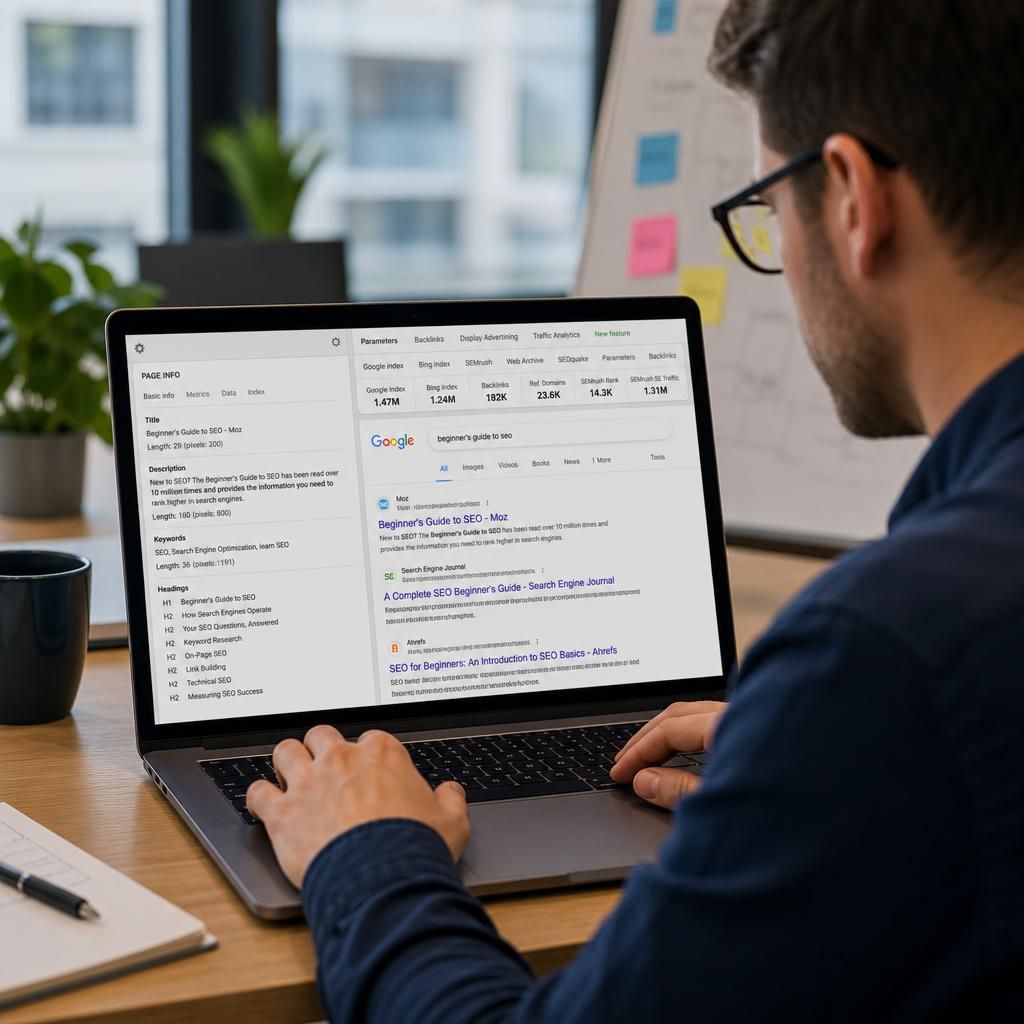
SEO Quake’s page analysis examines visible on-page SEO elements and selected information in the page source. It can show whether key elements are present and help you identify issues that may affect how clearly a page communicates its subject to users and search engines.
- Title tags, meta descriptions and heading structure
- Word count and the use of selected keywords or phrases
- Images, including available alternative text and file attributes
- Internal and external links, including destinations and visible anchor text
- Canonical tags, robots directives and social sharing metadata where available
Use these findings as a first diagnostic check rather than a complete SEO assessment. The tool can show what is present on the page, but editorial judgement is still needed to assess relevance, accuracy, readability and search intent.