
What can you do in Google Webmaster Console?
Google Webmaster Console, now known as Google Search Console, lets you monitor search performance, inspect how Google crawls and indexes your website, identify technical issues, submit sitemaps and request indexing. It also provides reports and recommendations to help improve your pages’ visibility in organic search.
Google Webmaster Console, now called Google Search Console, is a free service for monitoring how your website appears in Google Search and diagnosing problems that affect crawling, indexing and organic visibility. It does not change your rankings directly, but it shows how Google processes your pages and provides tools for resolving technical issues.
Monitor search performance
The Performance report shows the search queries and pages that generate impressions and clicks. You can analyse:
- Clicks from organic search
- Impressions, meaning how often pages were shown in search results
- Click-through rate, which compares clicks with impressions
- Average position for queries and pages
- The countries, devices and search types associated with your traffic
Use these insights to identify pages receiving impressions but few clicks, queries where your content is close to a stronger position, and important pages that are not appearing for the searches you expect. Search performance data is useful for prioritising content improvements, title and description changes, internal linking and technical investigation.
Check whether URLs are indexed
The URL Inspection tool lets you check how Google views a specific URL. It can show whether the page is known to Google, whether it is eligible for indexing, when it was last crawled and whether any indexing or enhancement issues were detected. Where available, the tool also provides information about the page’s canonical URL and the results of live testing.
This is particularly useful after publishing a new page, changing important content, moving a URL or correcting a technical problem. If the page is suitable for search, you can request indexing. A request is a crawl suggestion rather than a guarantee, so it does not ensure immediate inclusion or a particular ranking.
Submit and monitor XML sitemaps
You can submit an XML sitemap to help Google discover the URLs that matter on your website. Search Console reports whether the sitemap could be fetched and how many submitted URLs were discovered. A sitemap should normally contain canonical, indexable URLs that return a successful response. It should not be used to conceal broken links, duplicate pages or pages blocked from indexing.
Submitting a sitemap does not force pages into the index. It complements clear site architecture, relevant internal links and accessible, useful content.
Identify indexing and crawling issues
The Pages report groups URLs according to whether they are indexed, excluded or affected by an issue. Common reasons for exclusion include:
- A page having a noindex directive
- A duplicate URL being identified in favour of another canonical page
- A redirect preventing the inspected URL from being indexed
- A page returning a not found or server error
- Google being unable to access the page because of blocking rules
- A page being discovered but not currently crawled or indexed
These statuses are not automatically errors. For example, a deliberate noindex instruction or a redirected URL may be correct. Review the affected URL, compare the report with your intended site structure and investigate patterns rather than treating every excluded URL as a fault.
After resolving an issue, you can use the validation feature in the relevant report. Google will recrawl a sample of affected URLs and update the status when its checks are complete. Validation can take time and confirms that Google can now access the pages; it does not guarantee that every URL will be indexed.
Review enhancements and page experience
Depending on the website and its implementation, Search Console can report on structured data and other search enhancements. These reports identify valid items, warnings and errors that may prevent eligible features from being displayed. Structured data must accurately describe visible page content and should not be added solely to obtain enhanced search results.
Search Console also provides reports relating to page experience, including measures associated with loading performance, responsiveness and visual stability, together with mobile usability where applicable. These reports are diagnostic. Improving the underlying website experience is beneficial, but the presence of a good report does not guarantee higher rankings.
Investigate security and manual actions
The Security Issues report can alert you to problems such as hacked content, harmful downloads or deceptive pages. The Manual Actions report identifies cases where a reviewer has applied a search-related action because a site appears to breach search spam policies. If either report contains an issue, follow the stated examples, remove the cause and submit a reconsideration request where the service provides that option.
These reports should be checked separately from ordinary indexing exclusions. A page can be excluded for routine technical reasons without having a security or spam problem.
Manage removals and outdated results
The Removals tool can be used to request the temporary removal of eligible URLs or to manage outdated content in search results. Temporary removal is not a permanent replacement for deleting content, returning the correct status code or applying an appropriate noindex directive. If content must remain unavailable, address the underlying page or access controls as well as using the removal request.
Review links and site structure
Search Console provides an overview of internal and external links that Google has associated with the property. This can help you find important pages with limited internal links, review prominent linked pages and spot unexpected linking patterns. The link data is not a complete record of every link and should be used alongside a crawl of your own website.
Control property access and settings
Property owners can manage users and permissions, review verification methods and configure relevant settings. Choose the correct property type so that the data covers the intended domain, protocol and URL variations. Access should be limited according to each user’s responsibilities, particularly where the account includes permission to submit removals or manage users.
A practical way to use Search Console
- Check the Performance report regularly for changes in clicks, impressions, queries and important landing pages.
- Review indexing reports for recurring issues and investigate affected URL patterns.
- Inspect important new or changed URLs individually.
- Confirm that the XML sitemap is current and can be read successfully.
- Check security, manual action and enhancement reports after significant site changes or unexpected traffic changes.
- Record the technical or content change made, then compare the reports after Google has had time to recrawl the affected pages.
Search Console is most effective when its data is combined with your site analytics, crawl data and publishing records. It explains how Google Search sees the website, while other tools help assess user behaviour, conversions and issues that occur before or after a search visit.
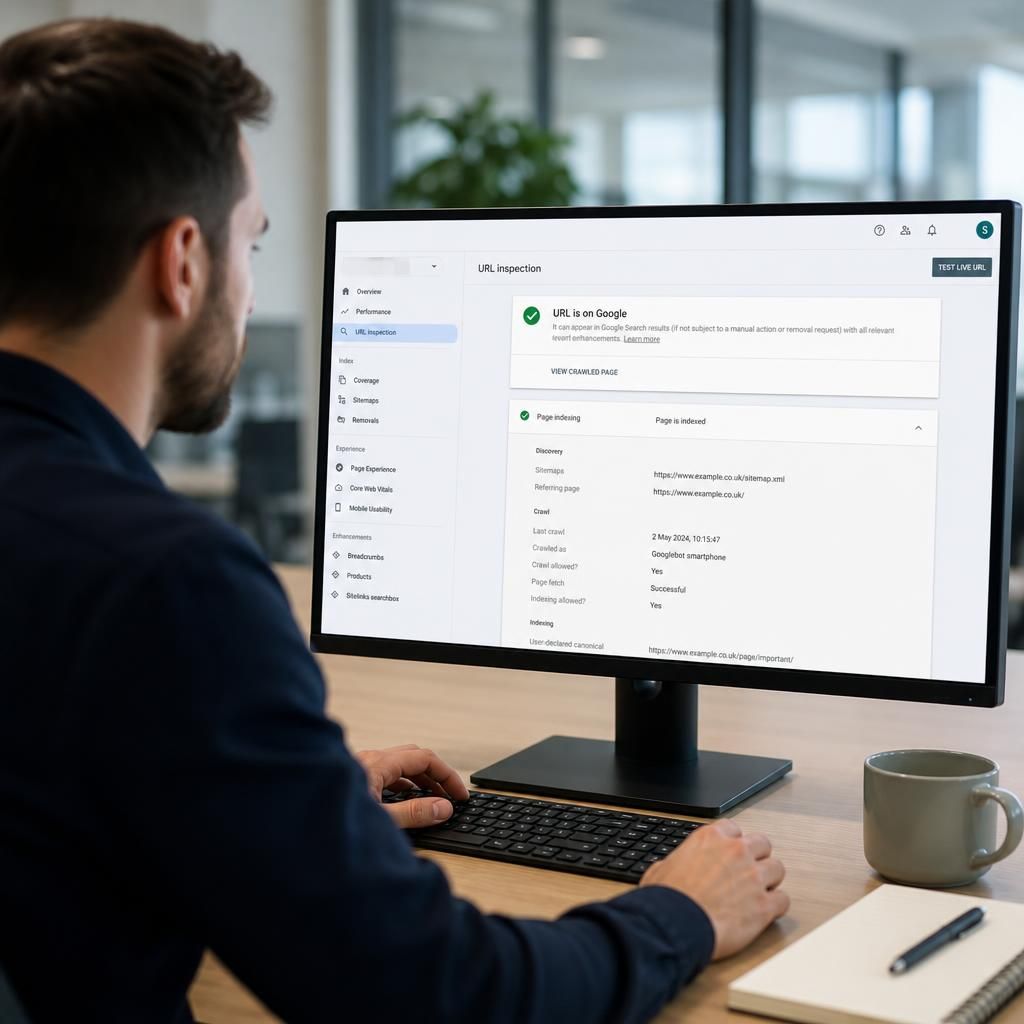
Google Search Console’s URL Inspection tool shows whether Google can access, crawl and potentially index a specific page. Enter a URL to review its indexed status, the selected canonical URL, the last crawl and any detected issues. You can also run a live test to check the page as Google can access it now.
Use URL Inspection when you publish or substantially update an important page, change its URL, or resolve a technical problem. If the page is accessible, indexable and suitable for search, you can request indexing. This asks Google to recrawl the URL but does not guarantee immediate indexing or improved rankings.
- Check that the page returns a successful response and is not blocked from crawling.
- Confirm that the intended canonical URL is being selected.
- Review any mobile, structured data or other enhancement issues shown.
- Inspect internal links and the XML sitemap if Google has not discovered the page.
For wider problems, use the Pages report to identify patterns across groups of URLs rather than inspecting every page individually. Individual inspection is best for important pages; report-level analysis is more effective for diagnosing recurring site-wide issues.