
How does Google Search Console guide SEO content updates?
Google Search Console guides SEO content updates by showing which queries and pages generate impressions, clicks and rankings, revealing where content is relevant but underperforming. Use these insights to refine search intent, improve titles and descriptions, expand useful sections and then monitor the Performance report to validate the changes.
Google Search Console guides SEO content updates by showing how individual pages perform for real search queries. Its Performance report connects queries, pages, impressions, clicks, click-through rate and average position, helping you identify content that is relevant to searchers but not achieving its full potential. These insights allow you to update the right page for the right reason, rather than making broad changes without evidence.
Start with the page and query relationship. In the Performance report, filter by a specific page and review the queries associated with it. This shows how Google currently understands the page and the topics for which it is being considered. Compare those queries with the page’s purpose, structure and level of detail.
Look for queries that are closely related to the page but are not addressed clearly in the content. They may reveal a missing subtopic, an unclear explanation or a different interpretation of the user’s intent. For example, a page written as a general overview may attract queries that indicate users want a practical process, comparison or troubleshooting guidance. The appropriate update may be to add a useful section, clarify the introduction or adjust the page so it better matches that intent.
Search Console should inform the editorial decision, not dictate the wording. Queries can be incomplete, repetitive or unsuitable for direct inclusion in a page. Use them as evidence of the language and needs appearing in search, then write naturally for the reader. Avoid adding every query as an exact phrase or expanding a page with material that does not support its main purpose.
Use impressions to find ranking opportunities. A page with impressions but relatively few clicks is being shown to searchers, yet its result may not be compelling enough or may not appear prominently for the relevant searches. Review the page title and meta description first. They should accurately communicate what the page covers, reflect the likely search intent and give the reader a clear reason to choose the result without making claims the page cannot support.
A low click-through rate does not always mean that the content itself is poor. The page may be appearing for broad or only partly relevant queries, or it may be competing with more suitable results for a particular intent. Before changing the title or description, inspect the queries and assess whether the page is targeting the right audience. If the queries are unsuitable, a content or targeting change may be more appropriate than a cosmetic metadata update.
Interpret average position carefully. Average position is useful for identifying broad movement and comparing similar pages, but it is not a fixed rank that every searcher sees. Results can vary according to the query, device, location, search context and other factors. Use position alongside impressions, clicks and query relevance. A page with a modest average position may still attract valuable traffic, while a page with a stronger average position may generate limited clicks if the intent or result presentation is weak.
For practical content work, group opportunities into a few common types:
- Relevant impressions with limited clicks: review the title, description, opening explanation and alignment with the search intent.
- Queries that are relevant but not covered: add genuinely useful information, examples, definitions or steps where they improve the page.
- Queries showing a different intent: decide whether to reshape the page, create a separate resource or leave the query unsupported.
- Strong clicks but declining performance: check whether the content is outdated, incomplete, technically affected or being displaced by more useful results.
- Several pages appearing for similar queries: review whether their purposes overlap and whether the site structure clearly distinguishes them.
Update the content around the user’s task. Once an opportunity is identified, make changes that improve usefulness rather than simply increasing keyword coverage. Strengthen the introduction so it answers the main need promptly. Clarify terminology, remove outdated guidance, add missing decision points and make processes easier to follow. Where appropriate, include examples, limitations and practical checks. Keep the page focused on its intended audience and avoid adding sections solely because a query appeared in Search Console.
Review related on-page elements at the same time. The title should describe the primary subject accurately, headings should make the content easy to scan, and internal references should help readers move to closely related information. Ensure that any updated claims, processes or product details are factually current. Changes to structured data, images or other page elements should also be checked if they affect how the page is understood or presented in search.
Record what changed and validate the result. Before editing, note the page’s principal queries, impressions, clicks, click-through rate and average position for the selected comparison period. After publishing, allow sufficient time for Google to recrawl and reassess the page, then compare the same page and query groups against the earlier period. Also check whether the page is attracting more relevant queries, not just more overall impressions.
Evaluate the outcome against the purpose of the update. A successful change may produce more qualified clicks, stronger visibility for relevant queries or clearer alignment with the intended search intent. A position change without improved relevance is not necessarily progress. Likewise, an initial decline does not automatically prove that the update failed, particularly if the page has been substantially refocused or the search results have changed.
Use the URL Inspection report when an important update does not appear to have been recognised or when you need to check the page’s indexing status. Confirm that the preferred URL is accessible, indexable and consistent with the version you intended to update. This supports the content analysis but does not replace reviewing the Performance report, as indexing confirms availability rather than proving that the page satisfies search intent.
The most reliable process is therefore continuous: use Search Console to identify a specific opportunity, diagnose the reason for underperformance, make a focused improvement and monitor the same page and queries afterwards. Over time, this creates an evidence-based content maintenance cycle in which updates are prioritised by relevance and potential value rather than by assumptions about which keywords a page should contain.
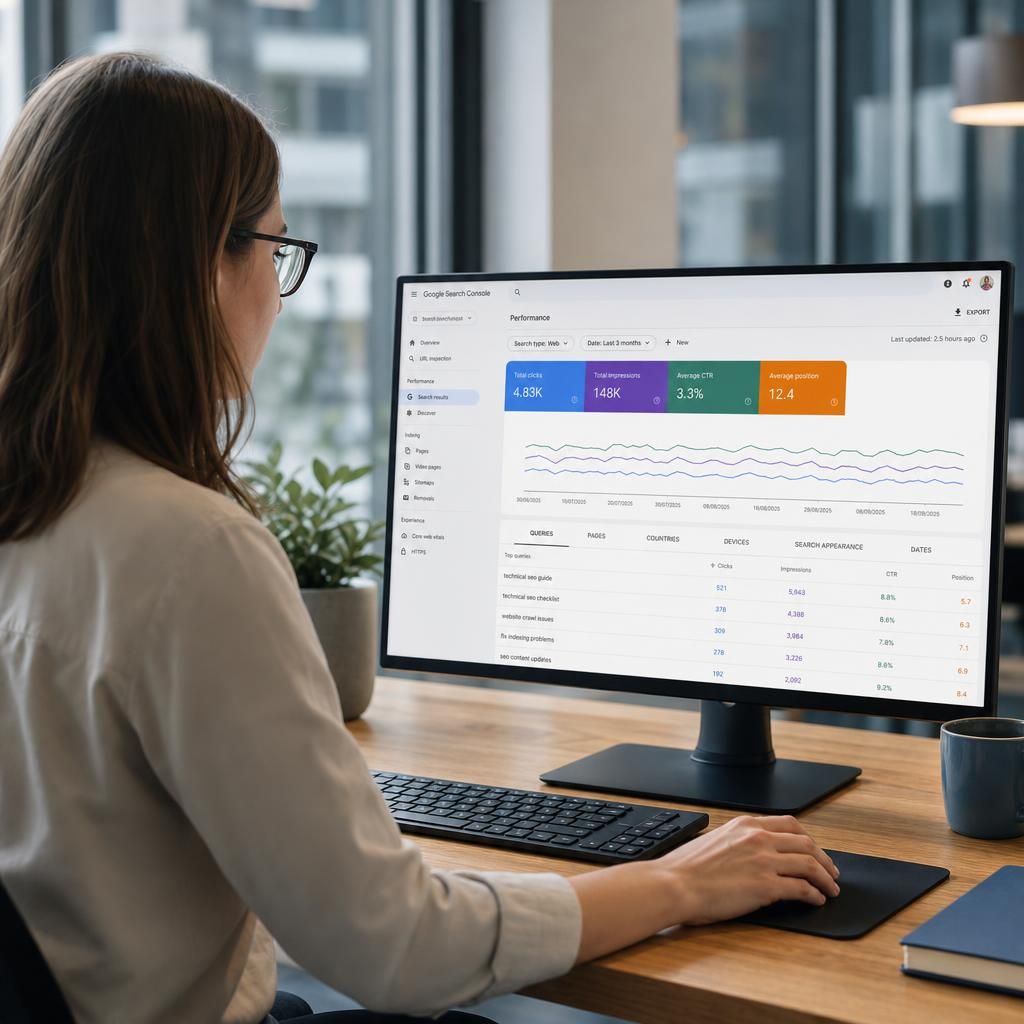
Google Search Console helps prioritise SEO content updates by showing where a page receives impressions but attracts fewer clicks than its visibility might suggest. This indicates that Google is presenting the page for relevant searches, but the result may not be sufficiently compelling or closely aligned with the searcher’s intent.
Review the associated queries before changing the page. If they match the page’s subject, assess whether the title and meta description describe the benefit clearly and accurately. The opening content should then confirm that the page answers the query. If the queries are broad, unrelated or indicate a different need, changing metadata alone is unlikely to solve the problem; the page may need clearer targeting, a revised structure or a separate resource.
After making a focused update, compare the same page and query groups over a consistent period. Look for more relevant clicks and improved engagement with the intended topic, rather than treating a rise in impressions or a change in average position as proof that the update worked.
Use Search Console to prioritise your next content update
Review your key pages in the Performance report to identify relevant queries with strong visibility but limited clicks, then prioritise a focused content update. Monitor the same pages and query groups after Google has recrawled them to assess whether performance has improved.